
Headless WordPress with Next.js in 2026: Complete Architecture & SEO Guide

WordPress remains a popular content management system because it makes publishing articles, managing pages, and organizing website content straightforward. Next.js, meanwhile, provides a modern React framework for building fast, flexible web applications.
Combining the two creates an architecture that separates content management from the public-facing website. This approach is known as Headless WordPress Next.js development.
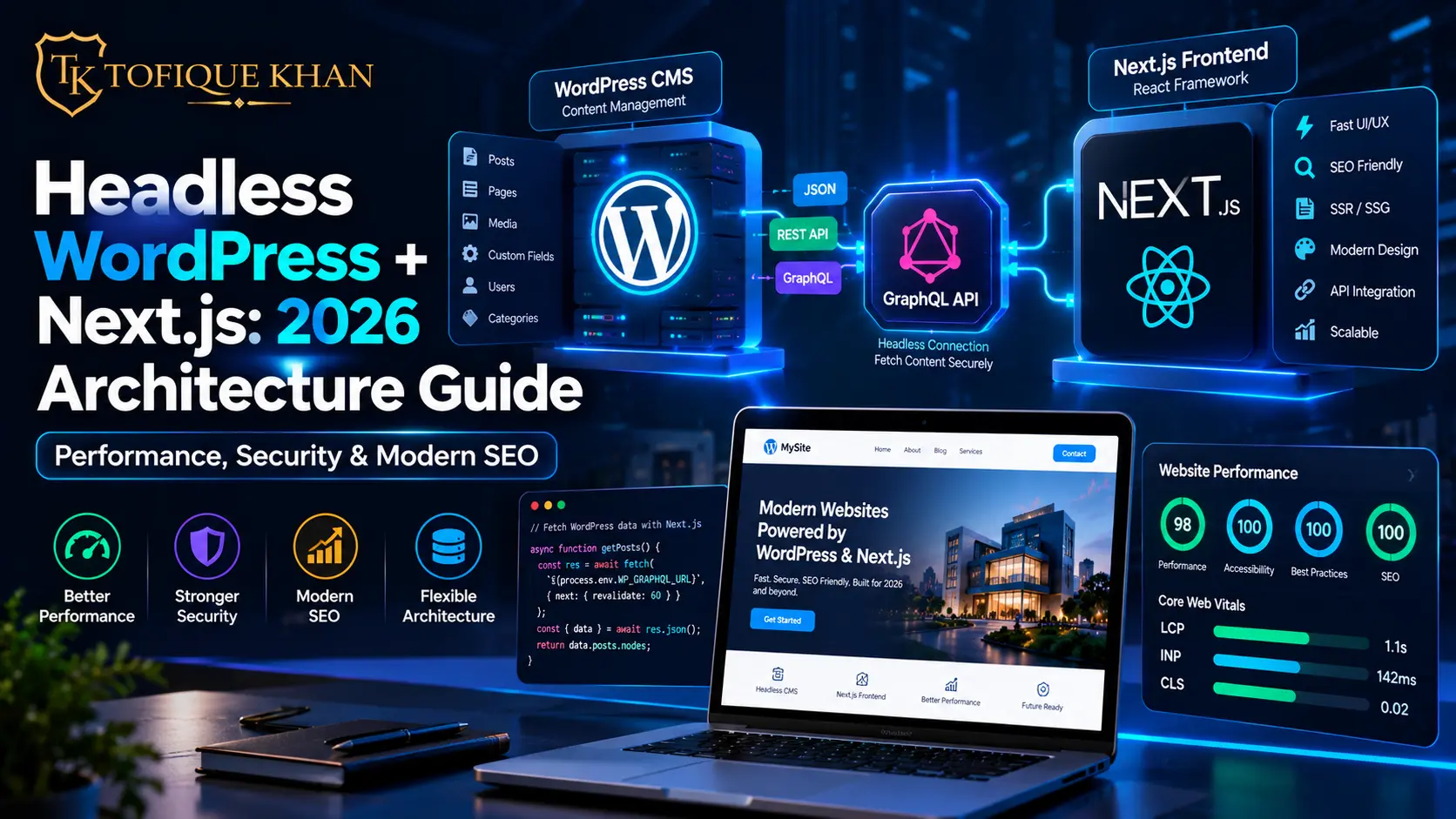
In this setup, WordPress manages content, media, users, and editorial workflows. Next.js retrieves that content through an API and renders the frontend using React. Developers can then use modern rendering, caching, and deployment strategies without giving up the familiar WordPress editing experience.
However, headless architecture is not automatically faster, safer, or better for every business. The result depends on implementation quality, hosting, caching, API performance, security controls, and ongoing maintenance.
This guide explains how the architecture works, how to connect WordPress with Next.js using WPGraphQL, and which SEO considerations matter before launching a production website.
- What Is Headless WordPress?
- Why Pair WordPress with Next.js?
- 1. Better Control Over Website Performance
- 2. A More Separated Security Model
- 3. Flexible Content Delivery
- 4. Modern Frontend Development
- Traditional WordPress vs. Headless Next.js Architecture
- Technical Implementation: Connecting WPGraphQL to Next.js App Router
- Step 1: Install WPGraphQL on WordPress
- Step 2: Create the Next.js Project
- Step 3: Fetch a WordPress Post with WPGraphQL
- Step 4: Render the Post in the App Router
- Step 5: Add Dynamic Metadata
- Step 6: Revalidate Content After WordPress Updates
- SEO Best Practices for Headless WordPress Sites
- 1. Generate Unique Metadata for Every Page
- 2. Implement Structured Data Carefully
- 3. Build a Reliable Sitemap and Robots Configuration
- 4. Render Important Content in Search-Friendly HTML
- 5. Optimize Images and Core Web Vitals
- 6. Preserve Internal Links and URL Structure
- Handling Media, Previews, and Forms
- WordPress Media
- Draft Previews
- Contact Forms
- WooCommerce and Ecommerce
- Frequently Asked Questions (FAQs)
- Is Headless WordPress with Next.js better than traditional WordPress?
- Can I use WPGraphQL with the Next.js App Router?
- Does headless WordPress automatically improve SEO?
- Is headless WordPress more secure?
- Can I keep using the Gutenberg editor?
- Is headless WordPress suitable for ecommerce?
- Conclusion: Is Headless WordPress Right for Your Business?
What Is Headless WordPress?
Traditional WordPress combines the content management system and the presentation layer. WordPress stores content in its database, while a theme determines how pages are rendered and delivered to visitors.
Headless WordPress separates these responsibilities.
WordPress continues to manage content, but the frontend is built independently using a framework such as Next.js. The two systems communicate through an API, commonly WPGraphQL or the WordPress REST API.
A simplified architecture looks like this:
WordPress CMS → WPGraphQL API → Next.js application → Visitor’s browser
For example, an editor publishes a blog post in WordPress. Next.js requests the post data, generates the page, and serves the resulting website to the visitor.
The frontend can use static generation, server rendering, caching, or a combination of these methods depending on the page and business requirements.
This separation is particularly useful when a business needs a customized frontend, a complex content model, or the ability to deliver content to multiple applications.
Why Pair WordPress with Next.js?
1. Better Control Over Website Performance
Next.js supports several rendering strategies, including static generation, server rendering, and revalidation of previously generated pages.
Static pages can be served from a CDN, reducing the need to execute WordPress PHP and database queries for every visitor. Frequently updated content can use a suitable caching and revalidation strategy.
Actual performance still depends on factors such as image size, JavaScript execution, API latency, hosting, and page design. A poorly implemented headless website can perform worse than a well-optimized traditional WordPress site.
2. A More Separated Security Model
With a headless architecture, the public website does not need to expose the WordPress theme as its frontend. WordPress can be hosted separately, and the public site can serve many pages from a cache.
This can reduce some exposure, but it does not eliminate security risks.
The WordPress administration area, plugins, API endpoints, authentication, webhooks, and hosting environment still need protection. Keep software updated, use strong authentication, restrict privileged access, and avoid exposing secrets in frontend code.
3. Flexible Content Delivery
WordPress can serve as the central content repository for a website and other applications.
Depending on the API and integrations, the same content may be used by:
- A Next.js business website
- A mobile application
- A customer portal
- An internal dashboard
- Other digital publishing channels
This flexibility is useful for businesses that need to distribute structured content across multiple platforms.
4. Modern Frontend Development
Developers can build reusable React components and use TypeScript, Tailwind CSS, and the Next.js App Router.
This makes it easier to create custom page layouts, interactive experiences, and shared design systems without being restricted to a traditional WordPress theme’s frontend structure.
Traditional WordPress vs. Headless Next.js Architecture
| Feature | Traditional WordPress | Headless WordPress with Next.js |
|---|---|---|
| Frontend | WordPress theme | Next.js and React |
| Content management | WordPress dashboard | WordPress dashboard |
| Content delivery | WordPress rendering | API-driven rendering |
| Performance strategy | Page caching, CDN, optimization | Static generation, caching, server rendering |
| Design flexibility | Theme and custom development | Custom React components |
| Security model | Combined CMS and frontend environment | Separated systems with independent controls |
| SEO configuration | WordPress SEO plugins and theme | Next.js metadata, rendering, sitemap, and schema |
| Complexity | Often simpler to operate | Requires API, deployment, and integration management |
| Maintenance | WordPress, theme, and plugins | WordPress plus Next.js and its dependencies |
The right choice depends on your goals. A small brochure website may work very well with traditional WordPress. A complex content platform or custom digital product may benefit from a headless architecture.
Technical Implementation: Connecting WPGraphQL to Next.js App Router
This example demonstrates a basic setup. Adjust package versions, API permissions, and field names to match your actual WordPress installation.
Step 1: Install WPGraphQL on WordPress
Install and activate the official WPGraphQL plugin from the WordPress dashboard.
After activation, configure WordPress permalinks and verify that the GraphQL endpoint is available, commonly at:
https://your-wordpress-domain.com/graphql
The endpoint should be tested before connecting the frontend. If your site uses custom post types, Advanced Custom Fields, or custom taxonomies, you may need additional configuration or compatible extensions to expose the required fields.
Official documentation: https://www.wpgraphql.com/docs/quick-start
Step 2: Create the Next.js Project
Create a Next.js application with the App Router. For a TypeScript project, a typical structure might look like this:
app/
  layout.tsx
  page.tsx
  blog/
    [slug]/
      page.tsx
lib/
  wordpress.ts
The blog/[slug]/page.tsx route will render individual posts. The lib/wordpress.ts module can contain the functions used to communicate with WordPress.
Store the GraphQL endpoint in a server-side environment variable:
WORDPRESS_GRAPHQL_ENDPOINT=https://your-wordpress-domain.com/graphqlDo not prefix this variable with NEXT_PUBLIC_ when it is intended for server-side use only. Never place private API credentials or secrets in browser-accessible code.
Step 3: Fetch a WordPress Post with WPGraphQL
Create a reusable server-side data-fetching function. The following example uses the WordPress post slug to retrieve a published post.
// lib/wordpress.ts

const endpoint = process.env.WORDPRESS_GRAPHQL_ENDPOINT;

if (!endpoint) {
  throw new Error("WORDPRESS_GRAPHQL_ENDPOINT is not configured");
}

export async function getPost(slug: string) {
  const query = `
    query GetPostBySlug($slug: ID!) {
      post(id: $slug, idType: SLUG) {
        title
        content
        excerpt
        date
        slug
        featuredImage {
          node {
            sourceUrl
            altText
          }
        }
      }
    }
  `;

  const response = await fetch(endpoint, {
    method: "POST",
    headers: {
      "Content-Type": "application/json",
    },
    body: JSON.stringify({
      query,
      variables: { slug },
    }),
    next: { revalidate: 3600 },
  });

  if (!response.ok) {
    throw new Error(`WordPress request failed: ${response.status}`);
  }

  const result = await response.json();

  if (result.errors?.length) {
    throw new Error("WordPress GraphQL query returned errors");
  }

  return result.data?.post ?? null;
}
This example uses a one-hour revalidation interval. Choose a suitable interval for your publishing workflow, or configure on-demand revalidation when editors publish or update content.
For production use, consider request timeouts, error handling, schema validation, caching behavior, and safe handling of draft content.
Step 4: Render the Post in the App Router
In current Next.js App Router versions, dynamic route parameters are asynchronous. A page can retrieve its slug and load the corresponding WordPress post.
// app/blog/[slug]/page.tsx

import { notFound } from "next/navigation";
import { getPost } from "@/lib/wordpress";

type Props = {
  params: Promise<{ slug: string }>;
};

export default async function BlogPost({ params }: Props) {
  const { slug } = await params;
  const post = await getPost(slug);

  if (!post) {
    notFound();
  }

  return (
    <main>
      <article>
        <h1>{post.title}</h1>

        <div
          dangerouslySetInnerHTML={{
            __html: post.content ?? "",
          }}
        />
      </article>
    </main>
  );
}
Security note: dangerouslySetInnerHTML should only be used with content that has been appropriately sanitized and is trusted. WordPress permissions and API access should also be configured correctly. If your editorial workflow allows untrusted HTML, sanitize it before rendering.
For a production website, also render the featured image, publication date, author information, related posts, and accessible navigation where relevant.
Step 5: Add Dynamic Metadata
Search engines need clear page titles, descriptions, canonical URLs, and social sharing metadata.
Next.js provides the generateMetadata function for generating metadata from page data.
// app/blog/[slug]/page.tsx

import type { Metadata } from "next";
import { notFound } from "next/navigation";
import { getPost } from "@/lib/wordpress";

type Props = {
  params: Promise<{ slug: string }>;
};

export async function generateMetadata(
  { params }: Props
): Promise<Metadata> {
  const { slug } = await params;
  const post = await getPost(slug);

  if (!post) {
    return {
      title: "Article Not Found",
      robots: { index: false, follow: false },
    };
  }

  const description = post.excerpt
    ?.replace(/<[^>]*>/g, "")
    .trim();

  return {
    title: `${post.title} | Tofique Khan`,
    description,
    alternates: {
      canonical: `https://www.tofiquekhan.com/blog/${post.slug}`,
    },
    openGraph: {
      type: "article",
      title: post.title,
      description,
      url: `https://www.tofiquekhan.com/blog/${post.slug}`,
      images: post.featuredImage?.node?.sourceUrl
        ? [post.featuredImage.node.sourceUrl]
        : [],
    },
  };
}
Use the actual canonical URL structure of your website. If your blog uses a different path or trailing-slash convention, update the example accordingly. A missing excerpt should also be handled with a suitable fallback description in production.
For complete reference, see the official Next.js metadata documentation: https://nextjs.org/docs/app/api-reference/functions/generate-metadata
Step 6: Revalidate Content After WordPress Updates
A one-hour cache interval may be sufficient for some blogs, but other websites need updates to appear immediately after publication.
You can use a WordPress webhook to notify a protected Next.js route when content changes. The route can validate the webhook’s signature or secret and then call revalidatePath() or revalidateTag().
The flow is:
- An editor publishes or updates a WordPress post.
- WordPress sends a webhook to the Next.js application.
- The application verifies the request.
- The application invalidates the relevant cached content.
- The next request receives updated content.
Do not expose an unrestricted revalidation endpoint. Validate incoming requests and limit which paths or tags they can invalidate.
SEO Best Practices for Headless WordPress Sites
A headless website can be search-friendly, but SEO does not happen automatically when you switch frameworks. You must deliberately implement the features that a WordPress theme or SEO plugin may previously have provided.
1. Generate Unique Metadata for Every Page
Each indexable page should have an appropriate title, meta description, canonical URL, and social sharing metadata.
Avoid using the same title and description across all posts. Retrieve metadata from WordPress or a dedicated SEO field integration, and provide sensible fallbacks for missing values.
If you use an SEO plugin in WordPress, check whether its metadata fields are exposed through WPGraphQL or another API integration. The frontend must actually retrieve and render those fields.
2. Implement Structured Data Carefully
Use JSON-LD where appropriate to describe the visible content and entities on your website.
Depending on the page, useful types may include:
OrganizationArticleorBlogPostingBreadcrumbListServiceLocalBusiness, where applicable
Keep structured data accurate and consistent with the page. Do not add unsupported review ratings, misleading business details, or schema for content that visitors cannot see.
Structured data helps search engines interpret content, but it does not guarantee rich results or AI citations.
3. Build a Reliable Sitemap and Robots Configuration
Your sitemap should include the canonical URLs of indexable pages. Update it when new posts are published or existing pages are removed.
Check that:
- Important pages are crawlable.
- Canonical URLs use the correct domain and path.
- Deleted content returns an appropriate status.
- Redirects point to the correct replacement URLs.
- Staging sites are not accidentally indexed.
- Robots rules do not block essential resources.
A headless website should also have a clear strategy for pagination, category archives, author pages, and other content routes.
4. Render Important Content in Search-Friendly HTML
Do not depend entirely on client-side JavaScript to reveal essential page content.
Next.js supports server rendering and static generation, which can deliver meaningful HTML with the initial response. Verify the actual rendered output instead of assuming that every route is pre-rendered.
Test important pages by viewing their source, inspecting rendered HTML, and using Google Search Console’s URL Inspection tool.
5. Optimize Images and Core Web Vitals
Use appropriately sized images, modern formats such as WebP or AVIF where suitable, and descriptive alt text.
Next.js Image can help manage image sizes and responsive delivery. Ensure remote image domains are configured correctly and that the WordPress media server remains accessible.
Monitor Core Web Vitals rather than promising a perfect score. Results depend on real user devices, network conditions, JavaScript, fonts, third-party scripts, hosting, and the page itself.
6. Preserve Internal Links and URL Structure
When migrating from traditional WordPress to Next.js, preserve existing URLs wherever possible.
If URLs must change, create relevant permanent redirects and update internal links, canonicals, and sitemaps. Avoid redirect chains and broken links.
Use descriptive anchor text to connect related articles and service pages. For example, a technical article can link to your website development and SEO service pages when those links are relevant to the reader.
Handling Media, Previews, and Forms
WordPress Media
WordPress can continue to store featured images and other media. The Next.js frontend retrieves the relevant URLs through WPGraphQL.
For images, configure Next.js image settings appropriately, and make sure alt text is available. If your media is served from a separate domain, confirm that the domain and delivery configuration are correct.
Draft Previews
Editors often need to preview unpublished content before it goes live.
A preview implementation should authenticate the editor, validate the requested content, and prevent draft pages from being indexed. Never expose draft content publicly through an unrestricted API route.
Contact Forms
Forms can be handled through a WordPress plugin’s API, a dedicated form service, or a server-side Next.js route.
Whichever approach you choose, implement server-side validation, spam protection, appropriate rate limiting, and secure handling of personal information. Do not rely only on browser-side validation.
WooCommerce and Ecommerce
A headless WooCommerce frontend can provide a customized shopping experience, but it adds complexity around carts, customer sessions, payments, stock, product filtering, and checkout.
Choose an integration that supports your specific WooCommerce version and required features. Test payment callbacks, inventory updates, account security, and checkout behavior before launch.
Frequently Asked Questions (FAQs)
Is Headless WordPress with Next.js better than traditional WordPress?
It depends on your requirements. Headless WordPress with Next.js offers more frontend flexibility and access to modern React rendering strategies, but it also requires additional development and maintenance. Traditional WordPress can be more practical for smaller websites and straightforward publishing needs.
Can I use WPGraphQL with the Next.js App Router?
Yes. WPGraphQL exposes WordPress content through a GraphQL API, which a Next.js server component can query. Your queries must match the fields and permissions available in your WordPress installation.
Does headless WordPress automatically improve SEO?
No. You must configure metadata, canonical URLs, structured data, sitemaps, redirects, internal links, and indexability correctly. Performance improvements are also dependent on implementation and hosting.
Is headless WordPress more secure?
It can reduce some frontend exposure by separating the public site from the WordPress rendering layer. However, the CMS, plugins, APIs, webhooks, credentials, and hosting still require proper security controls.
Can I keep using the Gutenberg editor?
Yes. Editors can continue writing and managing content in WordPress. The Next.js frontend then retrieves and renders that content. If your site relies on complex Gutenberg blocks, confirm how those blocks are exposed through the API and how the frontend will display them.
Is headless WordPress suitable for ecommerce?
It can be suitable for stores that need a custom frontend or specialized shopping experience. However, cart management, authentication, payments, inventory, and checkout must be integrated and tested carefully.
Conclusion: Is Headless WordPress Right for Your Business?
Headless WordPress Next.js architecture combines WordPress’s content management capabilities with a modern React frontend. It can be a strong choice for custom business websites, publishing platforms, and digital products that need greater frontend flexibility.
The decision should be based on business requirements, not on the assumption that headless automatically means faster, safer, or better ranked.
Before migrating, evaluate your content model, API requirements, hosting, editorial workflow, URL structure, caching strategy, security controls, and long-term maintenance budget.
If a headless setup fits your goals, start with a small proof of concept, measure real performance, validate the SEO implementation, and expand once the architecture is stable.
For businesses planning a new website or a technical upgrade, explore our Website Development Services in Delhi. You can also learn more about our SEO Services in Delhi to build a website with search visibility in mind from the beginning.
A well-planned architecture should support your content team, your developers, and your customers—not simply introduce a newer technology stack.